Initial release: Activepad is a Rails scratchpad for macOS
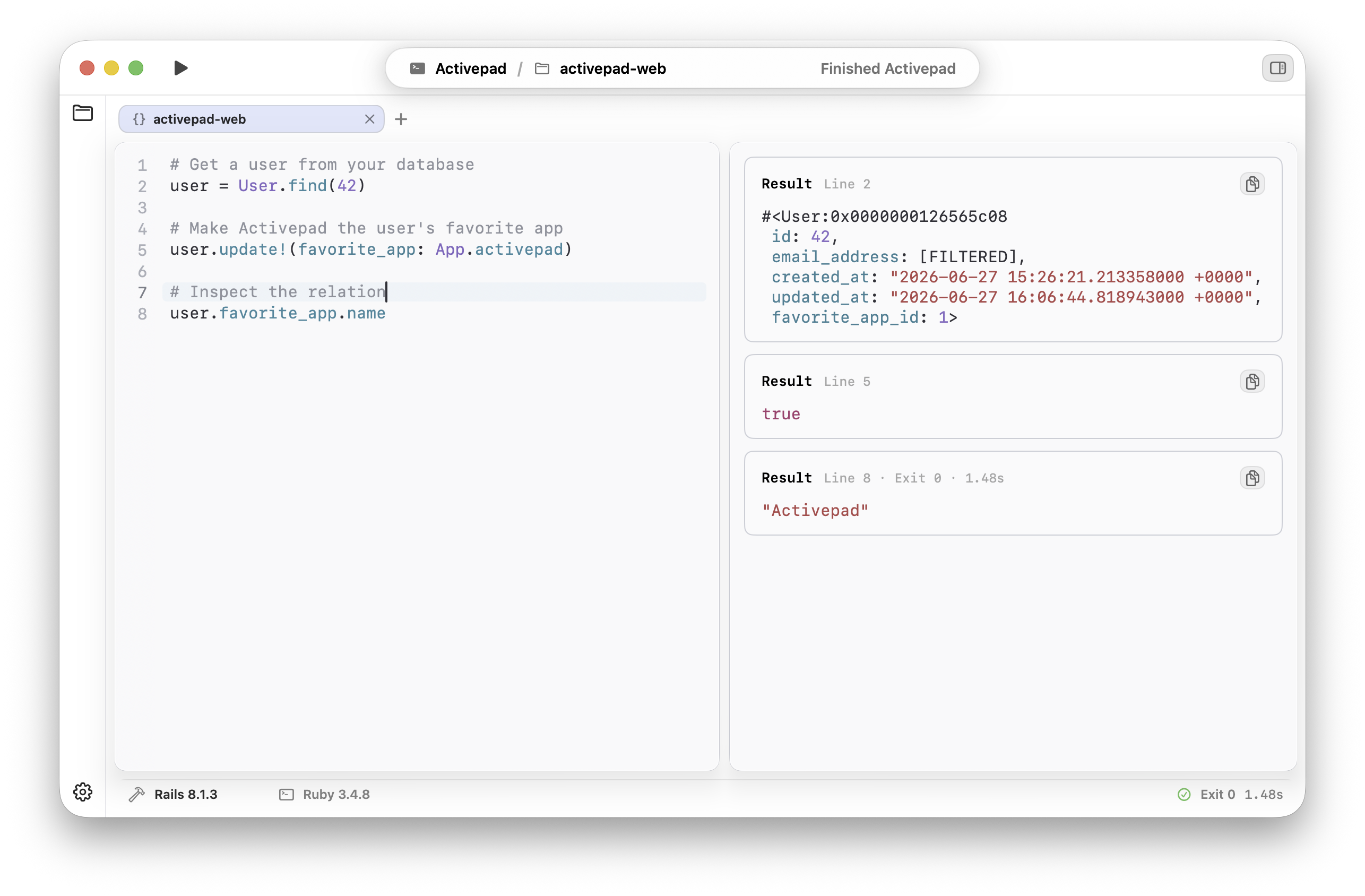
Activepad 0.1.0 is the first public release of a native macOS scratchpad for Rails developers. It is built for the moments when you want to try Ruby against a real app without turning the Rails console into a long, fragile notebook.
Activepad is a focused Rails scratchpad.
Open a local Rails app, write a Ruby snippet, run it against the same models, gems, database records, and relations your app already uses, then keep the result visible while you iterate.
It does not replace Rails, your editor, or the console. It gives the exploratory part of Rails development a calmer workspace: multi-line editing, clear execution output, errors, stdout, and returned Ruby values in one native Mac window.
The Rails console is powerful. It is not a great scratchpad.
Rails developers reach for the console constantly: checking an association, testing a scope, formatting a value, debugging a callback, or proving a small idea before changing application code.
That loop is fast until the useful context disappears into scrollback. A multi-line snippet gets edited by history gymnastics. Output and exceptions mix together. The result you cared about is suddenly three commands above the current prompt.
Activepad takes that same local Rails execution model and gives it a place designed for repeated, readable experiments.
How it works in this release.
- Open your Rails app. Point Activepad at a local project and run code through that app's Rails environment.
- Write focused Ruby. Use a scratchpad for multi-line snippets instead of packing everything into a single console prompt.
- See the full result. Keep returned values, stdout, and errors readable while you debug or explore.
- Iterate without losing context. Run one scratchpad at a time and keep the code and output next to each other.
What is included in 0.1.0.
The initial release is intentionally narrow: a signed and notarized macOS app, a native editor surface, execution against local Rails apps, output panes for the feedback that matters, and a simple license flow.
The product goal is to make the small Rails checks you already do all day feel easier to repeat, read, and trust.
Who Activepad is for.
Activepad is for Rails developers who spend a lot of time validating ideas against real application state: solo builders, small teams, consultants, and anyone debugging production-shaped behavior locally.
If you like the directness of the Rails console but want the work to feel less temporary, this first release is for you.
Try Activepad with your Rails app.
Download the macOS app, open a local Rails project, and run your next exploratory Ruby snippet in a workspace built for it.